.png)
This feature only available for Jira version 7.1.1 and above.
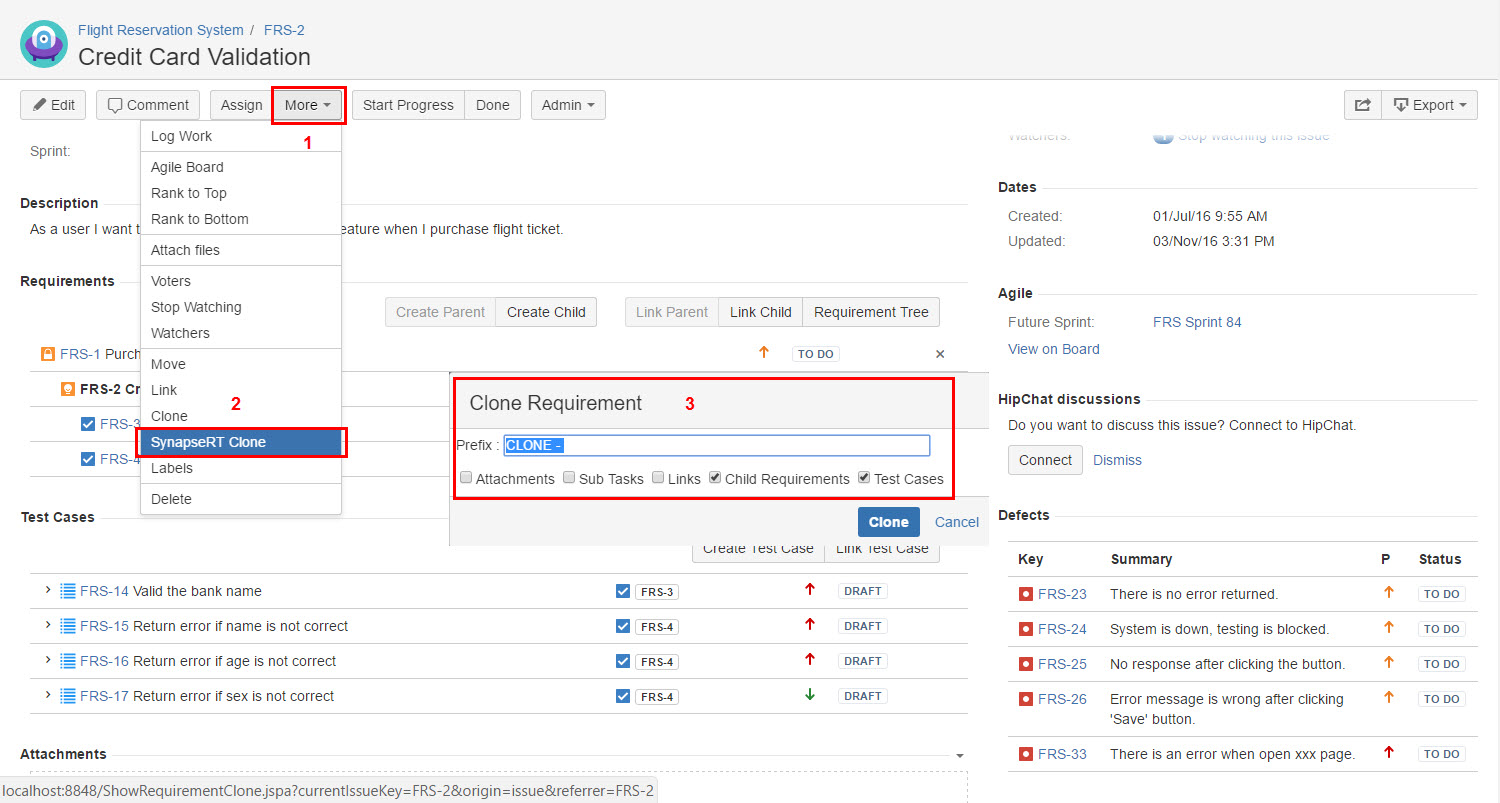
You can clone a Requirement when you view the Requirement issue by using "TestRay Clone" option. It saves user"s time for Requirement creation.
To clone a Requirement from "TestRay Clone" option, follow these steps:
-
Open a Requirement issue.
-
Click "More" button and then select "TestRay Clone".
-
From "Clone Requirement" pop up window, specify a new name for the cloned Requirement.
-
Choose to clone any of below additional information for your Requirement:
1) Attachments
2) Sub Tasks
3) Links
4) Child Requirements
5) Test Cases -
Click "Clone" button.
Once the clone is done, a new Requirement issue will be created in your current project.
Note: Child Requirements and Test Cases will be clone together if the options are selected.
[Screenshot - UG_v86_Requirement_Issue_TestRay_Clone]