.png)
Test Run Status
Test run status (test result) can be set for both test run step (step result) and test run (overall result) during test execution.
A step result records the pass/fail status of a single action within a test case. An overall result indicates the final pass/fail status of the entire test run after all steps finish.
In TestRay, the link between each step result and the overall result follows a strict hierarchical weight (or influence) rule. TestRay evaluates every step result in a test run and maps the "worst step result" (the highest weight) to the overall result.
The default weight for system test result is set as below:
|
System Test Result |
Weight |
|---|---|
|
Failed |
5 |
|
Blocked |
4 |
|
Not Tested |
3 |
|
PASSED |
2 |
|
NA |
1 |
User is allowed to customize the weight for both system test result and user created test result.
-
Weight value is integer from 0 to 10.
-
Weight value must be unique for each test result except 0.
-
If weight = 0, the corresponding test step result will not follow the rule of hierarchical weight, it will be ignored directly.
-
Weight = 0 can be set to multiple test results.
Configuration
Note
-
The following system default test run status are not allowed to be deleted: Passed, Failed, Blocked, Not Tested, NA
-
User is allowed to rename system default test run status
-
User is only allowed to disable & enable the following system default test run status: Passed, Failed, Blocked, NA
-
'Not Tested' is initial status of any test run, it is NOT allowed to delete & be disabled
-
If a test run status has already been updated to test runs, disable the test run status will NOT impact current result and report output, the status will not be available for any new created test runs
-
If a test run status has already been updated to test runs, delete the test run status will require migrating previous results to a new test run status
-
User is allowed to set category (Executed & Not Executed) of any test run status except 'Not Tested'
To configure test run status, follow these steps:
-
Click "Administration->Add-ons" from the main menu.
-
Click the "Test Run Status" link from the left panel under the "TestRay" section.
-
Specify values to below fields:
-
Status
-
Weight
-
Description
-
Category
-
Color (You can either fill color code manually, for example: #0000EE = Blue, or click on the color pane to choose color)
-
-
Click "Add" button.
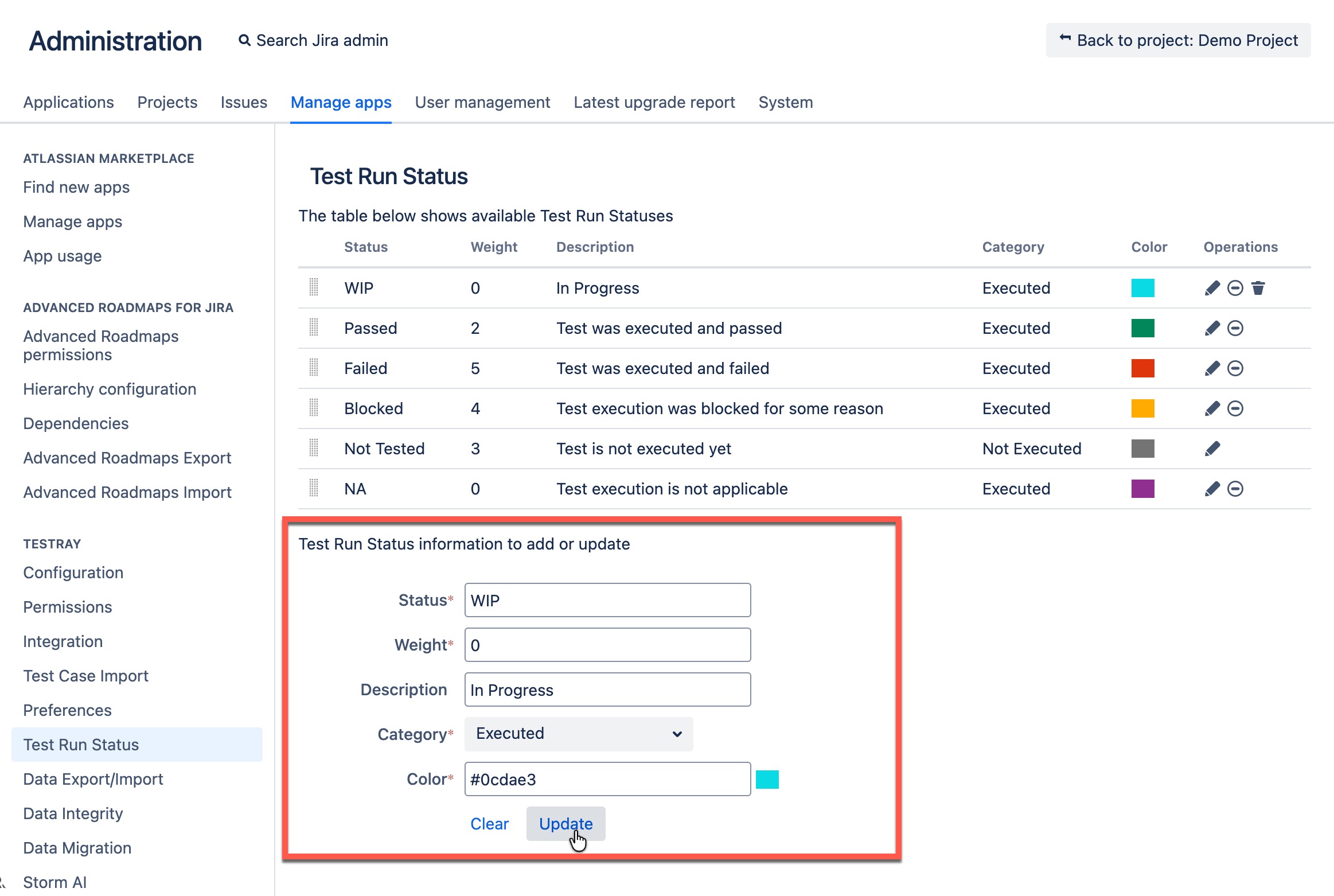
[Screenshot - UG_AD07_Status_Customize_01]
Once the new test run status is added, the status will be available in any test run window for your selection during test execution.
Any user created test run status can be deleted by clicking "Delete" icon follow that particular status.
The deleting process will require migrating existing results to any other one.
Tips
User can reorder test run status in the list, it will be reflected in result list during test execution and also in gadgets/reports.